
Fares & transfers
Include the price
Section titled “Include the price”Turn on Include Pricing in the debug UI. For an API request, add:
{ "includePricing": true }Standard pricing uses second class for trains.
Choose a train class
Section titled “Choose a train class”To request first-class train fares, add:
{ "includePricing": true, "pricingOptions": { "travelClass": "FIRST_CLASS" } }SECOND_CLASS is the default. Use FIRST_CLASS to compare first-class fares for a train journey, such as Utrecht Centraal → Driebergen-Zeist. Display the price returned for the selected journey.
When age affects the fare
Section titled “When age affects the fare”pricingOptions.age currently selects the 65+ tariff for flex services that have a separate senior tariff. Regular bus, tram, metro and train fares use standard pricing; general child and senior discounts are not currently applied. Bravoflex has the same configured adult and senior base fare.
For a supported flex service, include the traveller’s age:
{ "includePricing": true, "pricingOptions": { "age": 70 } }Open the breakdown
Section titled “Open the breakdown”Try Breda Airport → UMCG Hoofdingang, Groningen with Include Pricing and Use Flexible Routing enabled. Open a journey with Bravoflex, buses and a train transfer, then click its price.
Open this search in I’m Planner
Opens for the next weekday at 10:00 in your local time.
The search link compares regular public transport with Bravoflex connections.
The example below combines Bravoflex to Sint Willebrord, bus 162 to Etten-Leur, trains via Zwolle to Groningen, and bus 6 to UMCG. Its breakdown shows:
- A separate fare for each flex, bus and train leg.
- Any discounts returned for the selected journey. BravoFlex keeps its fare and the following regular leg’s entrance rate; this connection does not automatically receive a flex transfer discount.
- Langeafstandskorting on the connecting train: the train fares are calculated together, with the saving shown on the affected leg.
- The total fare for the whole journey.
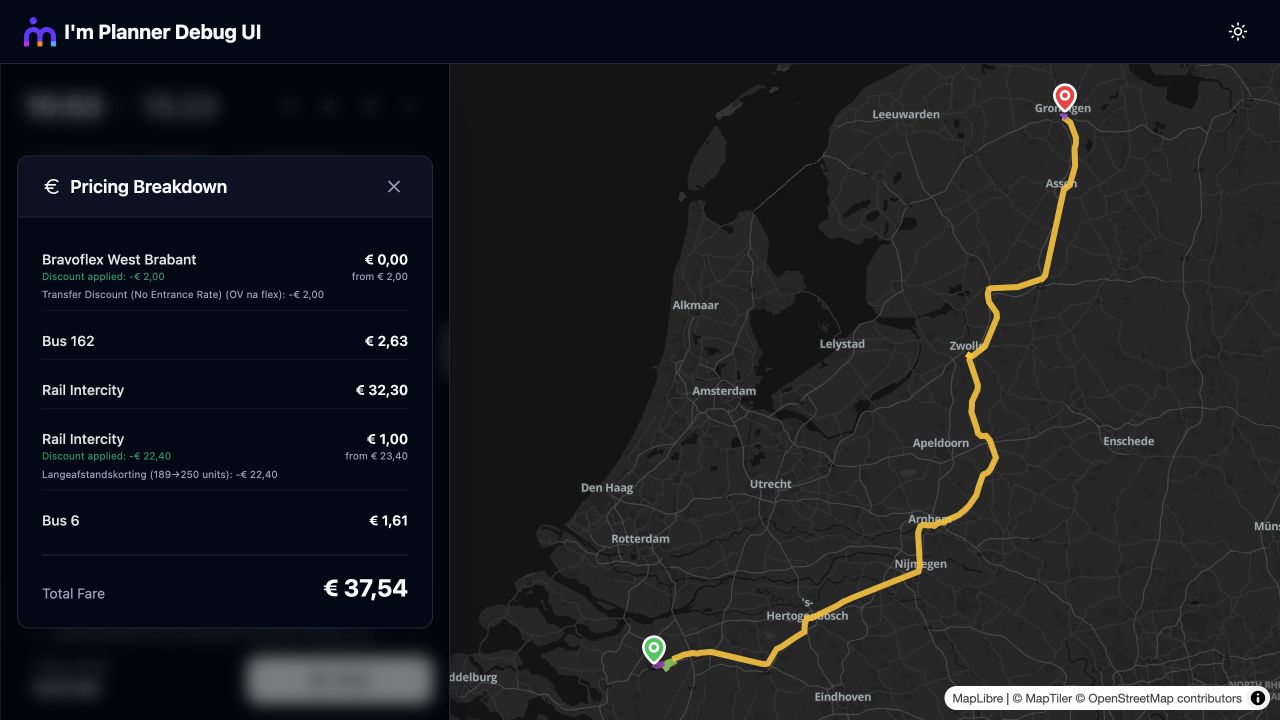
Bravoflex, bus 162, connecting trains and bus 6, with the fare breakdown and Langeafstandskorting.
The screenshot illustrates the breakdown layout; current searches can return different amounts and discounts. The first-mile flex entrance-rate waiver applies only to eligible U-OV Flex and HWGO belbus products followed by regular public transport within 35 minutes, excluding train boundaries. Use the returned discounts rather than deriving them from the presence of a flex leg. See the pricing changelog.
Display the amount
Section titled “Display the amount”Prices arrive in cents. Divide by 100 and use the returned currency:
const fare = trip.pricingInfo;const price = fare ? new Intl.NumberFormat('nl-NL', { style: 'currency', currency: fare.currency }).format((fare.totalPrice ?? 0) / 100) : 'Fare unavailable';Use Fare unavailable when pricing is absent. If any leg has status UNKNOWN, label the total Partial fare. Discounts include their own description and amount for your breakdown.
Explain check-in changes
Section titled “Explain check-in changes”Some train transfers include a check-out/check-in instruction. Use pricingInfo.transferInstruction to place it between the indicated legs. This helps the traveller know where to switch check-in systems.
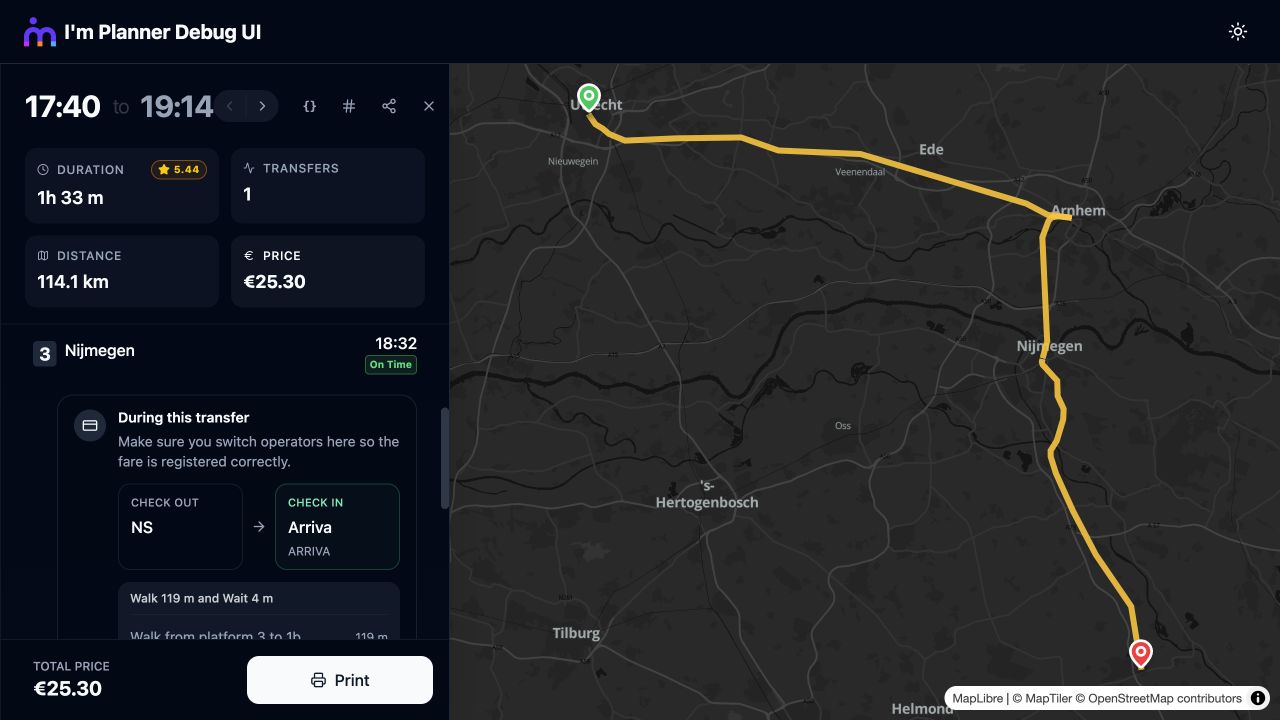
On a journey from Utrecht to Venray, change at Nijmegen: check out with NS and check in with Arriva before continuing.